
Did you know that more than 300,000 new domains are registered on the internet every day, yet most entrepreneurs choose their top-level domain almost blindly? I’ve encountered companies that spent years on website promotion, only to discover that their top-level domain works against them: it doesn’t match the target audience, it creates distrust, or it causes legal problems. After fourteen years working in web development and internet marketing, I have become convinced that choosing a TLD is not just a technical detail but a strategic decision that affects brand perception, localization, SEO, and user trust.
In this article I will explain what a top-level domain is and how it works in the DNS system, what types of TLDs exist and what they are intended for, how to choose the right domain for your business, avoid common mistakes, and use the domain as a marketing and brand protection tool. I will share practical tips that the BUSINESS SITE team applied when working with clients, from pharmaceutical companies to online stores and travel agencies. If you want to understand why your competitor ranks at the top of the results while you do not, or why customers trust one site more than another — read on.
What is a top-level domain and how does it work?

Let’s start with the basic concepts, because without them it’s difficult to make the right decision. A top-level domain (TLD, from the English Top-Level Domain) is the last part of a domain name, located after the final dot. For example, in the address `example.com` the TLD is `.com`, in `example.ua` it’s `.ua`, in `example.gov.uk` it’s `.uk`.
A top-level domain is not just a technical detail; it is part of a global hierarchy managed by the organizations ICANN (Internet Corporation for Assigned Names and Numbers) and IANA (Internet Assigned Numbers Authority). Each TLD is unique and registered in the DNS root zone. This means that two different sites cannot have the same top-level domain and second-level domain at the same time; the system guarantees uniqueness.
Domain name structure and TLD
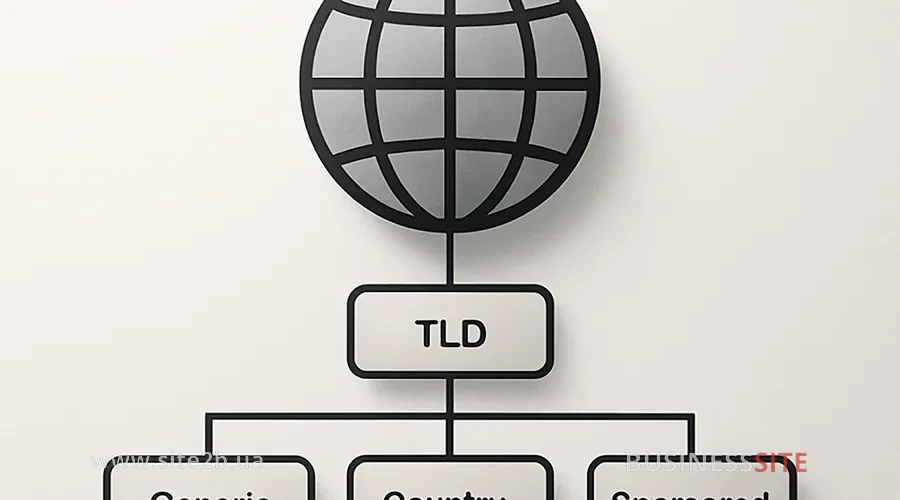
To fully understand how a top-level domain works, you need to see it in the context of the entire domain name structure. Imagine a domain name as a hierarchical system similar to an address with a ZIP code, city, street, and house number.
Here each level has its role:
- Root domain (root domain) – it’s the dot at the very end (`.`). It is invisible in the browser, but it exists in the DNS system and points to the root server.
- Top-level domain (TLD) – `.ua` in our example. It is the highest level in the domain name hierarchy. It indicates that this is a Ukrainian domain.
- Second-level domain (SLD, Second-Level Domain), `example` in our example. This is the part you register and that belongs to you. This is where your brand name resides.
- Subdomains (subdomains): `shop` in our example. These are additional levels you can create to organize different sections of the site. For example, `blog.example.com.ua`, `api.example.com.ua`, `mail.example.com.ua`.
Each level plays a role in the DNS system. When a browser resolves an address, it starts with the root domain, then goes to the TLD, then to the SLD, and finally to the subdomain. This allows the system to quickly find the right server and obtain the IP address of your site.
Types of top-level domains and their features

Now that you understand what a top-level domain is and how it works, let’s look at the types of TLDs. This is critically important because different types have different purposes, restrictions, and impact on your strategy.
Generic top-level domains: what are they and how do you use them?
Generic top-level domains (gTLD, Generic Top-Level Domain) are the most common and versatile TLDs. They are not tied to a specific country and are available for registration to almost anyone.
Classic gTLDs include:
- `.com` – commercial organizations, but in practice used for any purpose. It is the most recognizable and trusted TLD in the world.
- `.org`, nonprofit organizations, charitable foundations, community organizations.
- `.net`, originally for network organizations, but now used universally.
- `.info`, informational sites, blogs, directories.
- `.biz` – business sites, an alternative to `.com`.
Country-code top-level domains (ccTLDs)
Country-code top-level domains (ccTLD, Country-Code Top-Level Domain) are tied to a specific country and use two-letter ISO 3166-1 codes. For example:
- `.ua` – Ukraine
- `.uk` – United Kingdom
- `.de` – Germany
- `.fr` – France
- `.ca` – Canada
- `.au` – Australia
- `.jp` – Japan
- `.cn` – China
The BUSINESS SITE team worked with a pharmaceutical company that used `.com` for the Ukrainian market. After migrating to `.ua` and optimizing for local SEO, traffic from Ukraine increased by 45% over three months. This happened not only because of the domain change, but also because `.ua` sent a clear signal to the search engine about local relevance.
Sponsored top-level domains (sTLDs)
Sponsored top-level domains (sTLD, Sponsored Top-Level Domain) are managed by a sponsoring organization and have registration restrictions. They are intended for specific communities or purposes:
- `.edu`: educational institutions (universities, schools, colleges). Registration requires verification of educational institution status.
- `.gov` – government institutions. Available only to government organizations.
- `.mil`, U.S. military organizations.
- `.aero`: the aviation industry. Requires proof of affiliation with aviation.
- `.coop`, cooperatives and cooperative organizations.
- `.museum` – museums. Requires verification of museum status.
Generic restricted top-level domains
Generic restricted top-level domains (grTLD, Generic-Restricted Top-Level Domain) are a subcategory of gTLDs with registration restrictions. The best-known example is `.pro`. This domain is intended for professionals and requires proof of professional qualification at registration.
Other examples:
- `.name` – for personal websites and individual blogs.
- `.mobi`: for mobile sites and apps.
What are tTLD domains?
Test top-level domains (tTLD, Test Top-Level Domain) are reserved for testing and development. They will never be delegated to the DNS root zone and cannot be used for real websites:
- `.test`, for testing DNS configurations.
- `.example`: for examples in documentation.
- `.invalid`: for demonstrating invalid domains.
- `.localhost`: for local testing on your computer.
What are ARPA domains?
Infrastructure top-level domains (ARPA, Address and Routing Parameter Area) are used for the technical infrastructure of the Internet. The main example is `.arpa`, which is used for reverse DNS lookup and other technical purposes.
Internationalized domain names (IDNs): what are they?
Internationalized domains (IDN, Internationalized Domain Names) are a revolutionary development in the domain name system. They allow the use of non-Latin alphabet characters in domain names: Cyrillic, ideographs, Arabic letters, Greek characters, and others.
- `пример.укр`, Ukrainian domain in Cyrillic.
- `例え.jp`: Japanese domain in ideographs.
- `مثال.السعودية`, Saudi domain in Arabic.
The experience of BUSINESS SITE has shown that IDN domains are especially effective for local services that do not plan international expansion. For example, a Ukrainian travel agency can use a domain in Cyrillic to attract local clients searching for services in the Ukrainian language.
Choosing a top-level domain: mistakes and recommendations

Now that you know what types of top-level domains exist, let’s figure out how to choose the right TLD for your business. This is one of the most important decisions you’ll make when creating a website.
How to choose a domain for your website and business
The first question you should ask yourself: where are my customers located? If you operate only in the Ukrainian market, `.ua` is a logical choice. If you plan to work with an international audience, `.com` is the standard understood everywhere. If you specialize in a particular niche (for example, IT), `.tech` may be more effective than `.com`.
The second question: which domain is easier to remember and pronounce? Long, complicated domain names are forgotten. Short, simple, catchy ones are remembered. For example, `business-site.ua` is easier to remember than `business-site-ukraine-web-development.ua`. This affects not only direct traffic but also how people recommend your site to friends.
The fourth question: is the domain you want available? It often happens that the perfect name is already taken. In that case you have several options: use a different TLD (for example, if `example.com` is taken, try `example.ua` or `example.shop`), add a word to the name (for example, `example-pro.com`), or buy an existing domain at auction (it’s expensive, but sometimes justified).
The BUSINESS SITE team worked with the online store “Akon”, which initially used `.com`. When they decided to expand into the Ukrainian market, they registered `.ua` and created a localized version of the site. Result: traffic from Ukraine increased by 60% because users saw it was a Ukrainian store and trusted it more.
Common mistakes when choosing a domain
The first mistake: ignoring trademarks and legal risks. I have encountered companies that registered domains very similar to well-known brands and then received letters from lawyers demanding the domain be transferred. This is not only expensive but also harms your reputation. Always check before registration whether your domain infringes someone else’s trademarks.
The third mistake: insufficient research of similar domains. If you register `business-site.ua`, check whether `business-site.com`, `businesssite.ua`, `business-sites.ua` and other similar variants exist. If they exist and belong to competitors, this can lead to confusion and loss of traffic.
The fourth mistake, choosing a TLD that works against you in SEO. For example, if you use `.tk` (the Tokelau domain), Google may consider your site less authoritative because this domain is often used for spam. Choose TLDs with a good reputation.
Legal risks of a domain and brand
A top-level domain is not just a website address; it’s part of your brand and intellectual property. A wrong choice can lead to serious legal problems.
The first risk is trademark infringement. If you register a domain that is very similar to a well-known brand, the owner of that brand can file a complaint with ICANN and demand transfer of the domain. This is called UDRP (Uniform Domain-Name Dispute-Resolution Policy). The process is expensive and almost always ends in favor of the trademark owner.
The third risk is losing the domain due to poor management. If you forget to renew your domain registration, it can be taken by someone else. Set renewal reminders and use automatic renewal if possible.
The fourth risk is using a domain for illegal activities. If your domain is used for phishing, spreading malware or other illegal purposes, it can lead to domain suspension and legal prosecution. Always ensure your site complies with the law.
Where to buy a top-level domain
Now that you know which top-level domain to choose, let’s figure out where to buy it and how to do it safely.
Official domain registrars: companies accredited by ICANN that are authorized to register domains. The most popular are:
- GoDaddy – the largest registrar in the world, offering a wide selection of TLDs and additional services.
- NameCheap – known for low prices and good customer support.
- Google Domains – integrated with the Google ecosystem, convenient for DNS management.
- Hostinger: often offers hosting together with domain registration.
- Reg.ua, a Ukrainian registrar specializing in `.ua` domains.
All these registrars are accredited by ICANN and IANA, which means they comply with international standards and you can trust your registration.
When you register a domain, you don’t buy it forever – you lease it for a certain period (usually 1, 2, 3, 5, or 10 years). After that period expires you must renew the registration, otherwise the domain will become available for registration by others.
If you want to buy an already registered domain (for example, because it contains the perfect name you want), you can use domain auctions:
- Sedo: the world’s largest marketplace for buying and selling domains.
- Flippa – a platform for buying and selling websites, including domains.
- Afternic: specializes in premium domains.
Tips for secure registration:
- Use a reliable registrar with a good reputation.
- Enable two-factor authentication on your account.
- Use domain privacy (WHOIS privacy) to hide your personal information from the public.
- Set up automatic renewal so you don’t lose the domain.
- Store passwords and registration information in a secure place.
- Regularly check the registration information and make sure it is up to date.
Influence of top-level domains on business
Now let’s figure out how a top-level domain affects SEO and marketing. This is one of the most frequent questions clients ask me.
General impact of TLD on Google ranking: honestly, Google does not give any explicit advantage to one TLD over another. A site with `.com` will not automatically rank higher than a site with `.ua` if other factors are equal. Google looks at content quality, page load speed, mobile responsiveness, structured data and other factors, not the TLD.
On the other hand, there is an important exception: ccTLDs (country-code domains) carry special weight for geotargeting. When you use `.ua`, Google understands that your site is aimed at Ukraine and shows it primarily to Ukrainian users. This gives you a huge advantage in local SEO.
And that’s just one example. We’ve observed how .tech domains increased trust in IT startups, .pro boosted conversion for legal and consulting firms, and well-chosen international domains helped brands confidently enter Europe and the US. A domain is the foundation on which SEO, advertising, communications, brand identity, and scaling strategy are built.
Summary and main takeaway
A top-level domain is not a decorative element, not just a “tail” on the address, and not a technical formality. It’s as powerful a tool as a logo, brand identity, site structure, or content marketing. The right TLD:
- enhances customer trust,
- improves local SEO performance,
- reduces marketing costs,
- helps you stand out from competitors,
- protects the brand from legal risks,
- makes it easier to scale the business into new countries and languages.
Choosing a domain is a strategic decision and should be made deliberately: taking into account the market, audience, competitors, growth plans, and even industry-specific characteristics. If you choose a TLD “at random”, you’re leaving money on the table.
If you’re launching a new website, rebranding, or planning to enter a new market — pay maximum attention to the domain. Analyze the audience, compare competitors, evaluate potential risks, and plan your growth strategy for at least the next year. The right domain can work for you for many years, while the wrong one will result in loss of traffic, customers, and reputation.
The BUSINESS SITE team helps entrepreneurs and companies choose domains, develop strategies for their use, and integrate domains into comprehensive marketing. If you want to make sure your domain works for growth rather than against it — we’re ready to help.
Choosing a TLD is the starting point of your online identity. Make it strong.
Rate the article:





