
Every second user abandons a form if they encounter an unclear error or an unnecessary field. International studies of UX forms and checkouts show a persistent abandonment rate (form abandonment rate) above 60% — and in a significant share of cases the cause is validation that hinders rather than helps. I’ve repeatedly seen how a single bad rule on an e‑commerce checkout cut conversion by double-digit percentage points, while a properly built client-side and server-side validation produced a noticeable conversion rate uplift already in the first month.
I consider validation one of the most cost-effective areas for optimization, because it simultaneously affects security, data quality, and operational risks. Well-designed rules reduce the number of duplicates in CRM, cut accounting errors in orders and payments, and also speed up the time to complete the form. Together this increases LTV through better onboarding, reduces CAC thanks to higher conversion, and improves the ROI of the whole funnel.
Client and server validation
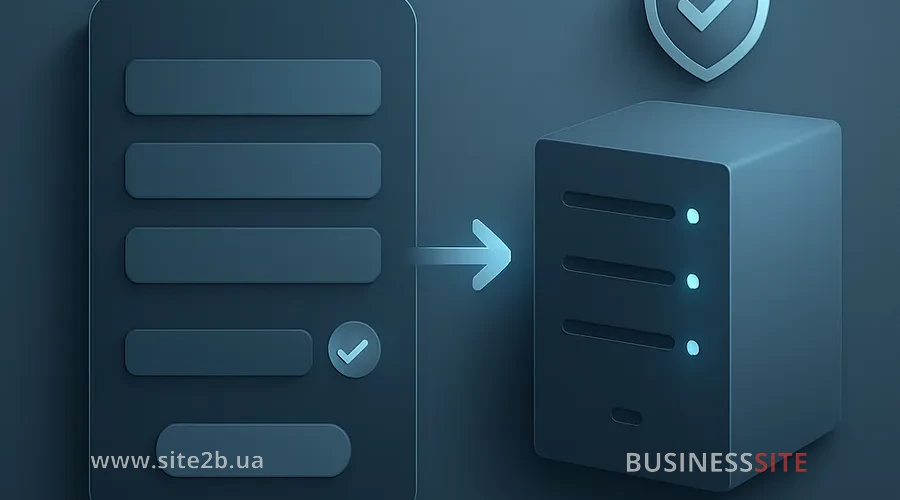
In my experience, each side has its own responsibilities, and a clear separation removes a lot of conflicts and incidents. Frontend validation is responsible for UX: inline feedback, clear microcopy, real-time input validation and hints that help a person complete an action. Server-side form validation takes care of integrity and security: sanitization, business rules, anti-fraud and data consistency in storage.
What to validate on the client
Frontend creates comfort and prevents obvious form errors even before submission. Inline validation of form fields and real-time input validation help the user fix the problem right at the source without losing context. For phone numbers it is useful to apply the E.164 format and masks with automatic normalization, and for email — hints like “Did you mean gmail.com?” and email validation with syntax checks and asynchronous MX record verification.
What to validate on the server
Server: it’s the place where rules protect the business. I pay special attention to input sanitization, serialization and deserialization of incoming data, protection against XSS and CSRF, as well as parameterized queries and prepared statements to prevent SQL injection. On the backend it’s convenient to implement rate limiting, idempotency tokens and duplicate prevention for repeated form submissions, especially on mobile networks.
Validating the UX of forms to reduce abandonment

Good validation looks like care, not like a policeman with a baton. I recommend an optimistic UX: minimally blocking errors, asynchronous checks and gentle delays using debounce/throttle so warnings don’t “blink” on every character. Progressive disclosure (forms with progressive disclosure) and progressive profiling reduce the number of fields shown at once and increase the user’s focus on a single step.
Inline validation and micro-hints
Inline feedback saves time when it’s specific and friendly. Instead of “Invalid format” it’s better to write “Enter the phone number in international format: +380 XX XXX XX XX”, and provide an example under the field. In A/B tests we compared harshly worded errors and micro-hints with advice and a link “Why are we asking this?”: the hint version produced a higher completion rate by several percentage points.
Multi-step forms and progressive profiling
Multi-step forms help to process complex forms in small chunks. It’s important to save progress, show a step indicator and allow returning without losing data. Progressive profiling is appropriate to add in subsequent touchpoints: first basic data, then clarifications, and collect extended fields after the first transaction or after authentication.
Frontend/Backend Validation Tools
On the frontend, React Hook Form and Formik are convenient for managing form state and performance. For validation rules, Yup or Zod: Yup, a validation library, provides familiar schemas; Zod, a type validation library, integrates closely with TypeScript and provides stricter types. On the backend, Joi for Node.js and Ajv, a JSON Schema validator, are appropriate — Ajv validates JSON quickly and pairs well with OpenAPI.
Integrating React Hook Form with Zod and Yup
React Hook Form provides excellent performance thanks to uncontrolled components and fine-grained re-renders. Paired with Zod, you get precise typing and unified error messages, and you can connect Yup via a resolver where it’s more convenient. We simplify messages, write micro-hints, and configure debouncing for inline validation so as not to distract the user with excessive triggers.
AJV and JSON Schema for REST API Validation
Ajv is a fast JSON Schema validator that performs well in production even under load. In BUSINESS SITE projects, we generate TypeScript types from the schema, build contract testing for the API, and check compatibility when changes occur. Such a pipeline allows detecting breaking changes before release and coordinating updates between microservices.
Validation: microservices and serverless

Architecturally there are two directions: a centralized rules library and distributed validators in microservices. The centralized module provides consistency and easy evolution of rules, while the distributed approach scales better and is closer to each service’s domain logic. In several projects we combine: common formats and sanitization are moved to a shared‑package, domain rules are kept next to the service.
Choose a centralized validator
A centralized validator is good when a uniform interpretation of rules and quick fixes are critical. In the corporate accounting system of a pharma client we thus stabilized data quality between web forms, the mobile app, and imports from marketplaces like Prom.ua. The downside is the need to scale and strict version control, so it’s important to adopt semantic versioning and monitor performance.
Fallback and rollback during validation
Any new rule is better released via feature flags and gradually. In BUSINESS SITE we deploy canary releases, measure error rate by fields, and look at conversion rate uplift before full rollout. If the error increase exceeds the threshold, a rollback to the previous schema version is provided and fallback logic on the server is enabled.
Validation and protection against XSS and SQL injections

Security starts with the basics, which save budgets and reputation. Sanitization, strict serialization/deserialization, parameterized queries and prepared statements form a line of defense against injections. CSRF protection, XSS filters, content policies and rate limiting reduce the risk of abuse, and idempotency tokens prevent double orders and duplicate charges.
Anti-fraud: false positives
Strict rules filter out attackers, but excessive strictness reduces sales. Balance is found by gradual tightening, A/B testing of anti-fraud thresholds and using behavioral signals. Honeypot fields and behavior-based CAPTCHA alternatives reduce friction, and risky requests are sent for additional review instead of an outright block.
Validation metrics: failures and conversions
A strong validation system is always measurable. Key KPIs: form abandonment rate, field-level error rate, conversion rate uplift and time to complete the form. I tie these metrics to business metrics LTV and CAC to demonstrate the impact of improvements on revenue and customer acquisition cost.
How to set up events and tracking?
I build a single event dictionary: focus/blur on fields, submit_attempt, validation_error with code and message, success and abandon with time on the step. For A/B tests I add custom properties: schema version, feature flag branch, hint type. This data allows evaluating whether validation affects conversion not only on average, but across audiences and devices.
Testing validation rules
Tests reduce the risk of regressions and make changes predictable. I use unit tests for rules, integration tests for frontend/backend interactions and property‑based testing for complex fields (for example, addresses and promo codes). API contract testing with OpenAPI/GraphQL prevents incompatibilities between services at the schema level.
CI/CD tools for validation
We integrate schema checks into the pipeline: linting JSON Schema, auto-generating test cases from boundary values and snapshotting messages. Contract testing runs on every merge, and reports are available to product and QA. This turns validation into a transparent process understandable by all stakeholders.
Strategies for e-commerce and lead generation
In e‑commerce we optimize the checkout and reduce abandoned carts. Inline validation of coupons, address-field hints tailored to the formats of «Nova Poshta» and verification of payment tokens via the provider help close deals without unnecessary contacts with support. In one online store where the BUSINESS SITE team implemented a multi-step checkout with hints and phone normalization, we saw a short-term double-digit uplift in the conversion rate at payment.
Use cases for reducing abandoned carts
At the payment stage, promo-code validation that provides a detailed reason why a code wasn’t applied and what can be done helps. For credit cards, it’s beneficial to use PCI‑compliant widgets with format hints and automatic detection of the payment system. In retail projects we’ve seen how these small details, plus cart preservation and auto‑save of forms, increased order completion on launch day.
Tools, checklist and examples
For a quick start React Hook Form or Formik on the frontend, Zod or Yup for rules, Ajv with JSON Schema on the backend, as well as Sentry and Datadog for errors and metrics will work. For product analytics I recommend PostHog/Amplitude, and for investigations – LogRocket and session replay. A centralized validation rules library and OpenAPI/GraphQL contracts will provide a common language between teams.
Validation release checklist
- The contract is ready and versioned. Schemas in JSON Schema/OpenAPI are agreed and types for the frontend and backend have been generated.
- Unit and integration tests cover key rules. Property-based tests have been added for complex fields and negative scenarios.
- A feature flag is configured for the new rules. The canary covers a safe percentage of traffic and has a clearly defined rollback threshold.
- Logs and alerts are enabled. Sentry/Datadog collect errors with field codes and correlate them with the release.
- Metrics are defined and the dashboard is ready. Tracking includes form abandonment rate, error rate by field, time to complete, and conversion.
- UX texts are localized. Messages are clear, contain “how to fix” instructions, and take ARIA attributes into account.
- Security is verified. There is sanitization, protection against XSS/CSRF, rate limiting, and idempotency tokens.
- A fallback is provided. If the validator is unavailable, the form works with basic checks and retains data.
- Documentation is updated. Rules, versions, fields, and reasons for rejections are described for support and analytics.
- A post-release monitoring plan is agreed. Owners are assigned, response times are defined, and communication channels are set up.
How to assess the ROI of form validation
I measure uplift through A/B tests and tie it to downstream revenue. If the form conversion increased from 3% to 3.6%, and the average revenue per submission is unchanged, the net gain is 20% for that step. Next we calculate operational expenses vs one-time development cost: development, QA, analytics and supporting license costs are compared to the additional revenue and savings from reduced errors.
Form failure analysis: methods and measures
For investigations I collect session replays, heatmaps, per-field error logs and funnel analytics. I classify causes into UX issues (copy, ordering, hints), technical ones (slow responses, timeouts), validation errors (rules that are too strict) and security (blocks, anti-fraud). This breakdown helps prioritize and choose quick fixes or architectural tasks.
Roadmap and feature flags for implementation
I am building a 90/180-day roadmap. In the first 90 days: audit of forms and failure cases, migration of rules to JSON Schema/OpenAPI, MVP of client-side validation, basic server-side sanitization, launching tracking and dashboards. By 180 days: integration with external services, enhancement of anti-fraud measures, edge validation for lightweight checks, A/B testing of messaging, strengthening SLA and fault tolerance.
Frequently Asked Questions
This FAQ section collects 3–6 questions that help quickly clarify common doubts when designing forms and validation. Below we’ll consider whether it’s worth relying entirely on client-side validation to improve UX and what practical consequences that may have.
Rely on client-side validation for UX?
Client-side validation creates a great UX and saves the user’s time, so it’s recommended to always use it. Server-side validation provides security and consistency, so it’s mandatory regardless of the frontend.
Which fields increase the abandonment rate?
Most often phone numbers, addresses, passwords and promo codes fail. I recommend using input masks and normalizing phone numbers to E.164, address autocomplete, clear password criteria, and friendly explanations of why a promo code wasn’t applied.
Testing new validation on conversions
Run an A/B test with a feature flag and a limited share of traffic. Track form abandonment rate, field-level error rate and time to complete the form, then decide based on the uplift results.
Can you use JSON Schema and Zod?
Yes, it’s a convenient combination. JSON Schema handles the contract and compatibility between services, while Zod provides runtime types and TypeScript typing on the frontend and backend.
Metrics for releasing validation rules
Minimum set: form abandonment rate, field-level error rate, step conversion rate and overall conversion, as well as average time to complete the form. Additionally, it’s useful to track the share of autocorrections and the number of support requests related to the form.
Conclusion and call to action
Validation: it’s a balance of UX and security, and a contract schema plus monitoring turn it into a system that’s easy to manage. When the frontend provides inline feedback and reduces cognitive load, and the backend protects data and ensures integrity, failures fall and conversion grows. In practice BUSINESS SITE confirms this in projects of various scales – from lead generation in pharma to e-commerce checkouts.
Rate the article:





