
In the artificial intelligence market, where giants like OpenAI, Google, and Microsoft dominate, a new player has emerged — DeepSeek. In just a few months, it has not only captured the attention of the tech community but also sparked real excitement, which reflected in the stock market. How did this happen? Let’s dive in.
DeepSeek introduced its new language model, which instantly took the top spots in technology rankings. Within a week of the announcement, API usage requests exceeded 10 million, and developers rated it 4.9 out of 5. But that was just the beginning.
DeepSeek offered what competitors couldn’t: a language model that doesn’t just generate text but understands context, learns from each query, and provides personalized solutions for businesses.
Why is DeepSeek a breakthrough?
- Speed and accuracy.
- Flexibility.
- Energy efficiency.
But what makes this system so unique? Let’s explore it further.
What is DeepSeek, and how does it work?
DeepSeek is not just another language model—it’s a powerful tool designed to solve real business challenges. If you’ve ever experienced ChatGPT or other AI solutions providing generic responses, lacking context awareness, or requiring massive computing resources, then DeepSeek is exactly what you need.

Unlike many existing solutions, DeepSeek doesn’t just process requests; it analyzes them in context. For example, if you ask, “How can I increase sales?”, ChatGPT will give you a general list of tips. DeepSeek, on the other hand, will clarify: “What industry are you in? What sales channels do you already use? What is your budget?” This allows it to provide personalized recommendations that actually work.
For example, at BUSINESS SITE, we implemented DeepSeek to automate customer inquiries, and response time was reduced from 10 minutes to just 30 seconds.
DeepSeek seamlessly integrates with existing systems like CRM, ERP, and marketing platforms, making it a universal tool for businesses of all sizes.
DeepSeek is not just a technology; it’s a partner that assists you at every stage. From data analysis to solution implementation, the system supports you, providing clear and measurable results.
- Request Analysis
When you ask a question or enter a query, DeepSeek analyzes not only the text but also the context. For instance, if you ask, “How can I optimize my website?”, the system will clarify: “What type of website do you have? What goals are you pursuing? What tools are you already using?”
- Continuous Learning
DeepSeek constantly learns from new data. This means that with each query, the system becomes smarter and more accurate. For example, if you use DeepSeek for market analysis, it will consider the latest trends and changes.
- Personalized Results
DeepSeek tailors results to your needs. For instance, if you’re a marketer, the system will suggest marketing strategies based on your target audience and budget. If you’re a business owner, DeepSeek will help you optimize business processes.
- Seamless Integration
DeepSeek easily integrates with CRM, ERP, and other platforms, allowing you to automate routine tasks and focus on strategic priorities.

DeepSeek is not just a tool—it’s a new approach to problem-solving. It combines speed, accuracy, and flexibility, making it indispensable for businesses of any scale.
At BUSINESS SITE, we have already helped dozens of clients implement DeepSeek and achieve measurable results. If you’d like to see how it can work for your business, get in touch with us.
DeepSeek in everyday life
DeepSeek can be your personal assistant in everyday life. Imagine having access to a technology that understands your needs, saves time, and makes life easier. Let’s explore how DeepSeek can be helpful in daily situations.

- Daily planning and time management
Does your morning start in chaos? DeepSeek helps you organize your day. Simply say, “Create a schedule for today,” and the system will consider your meetings, tasks, and even preferences. For example, if you enjoy morning workouts, DeepSeek will suggest the best time for your training.
You say: “I have a meeting at 2:00 PM, I need to go to the gym and buy groceries.” DeepSeek responds: “I recommend training from 9:00 to 10:00 AM, followed by a grocery run. It’s better to move your meeting to 3:00 PM to avoid rushing.” - Information search and learning
DeepSeek is like your personal Google, only smarter. If you need to find information quickly, the system won’t just provide links—it will give you a ready-made answer with relevant context.
You ask: “How do I make carbonara pasta?” DeepSeek not only provides the recipe but also considers that you don’t have cream at home and suggests an alternative version. - Travel planning
Planning a vacation? DeepSeek acts as your travel guide. It will create the best route, suggest hotels within your budget, and even recommend restaurants with top reviews.
You say: “I want to go to Italy for 10 days, with a $2000 budget.” DeepSeek suggests a route including Rome, Florence, and Venice, tailored to your food preferences and interests (e.g., museums or beaches).

At BUSINESS SITE, we have already helped many clients integrate DeepSeek into their daily lives, and the results speak for themselves.
How to Install DeepSeek
DeepSeek is a powerful tool that can become your personal assistant on both your computer and smartphone. Installation takes just a few minutes, and here’s how to do it easily.
How to Install DeepSeek on a PC
You can use DeepSeek on your PC either in a browser or via the desktop application.

- Go to the official DeepSeek website
- Download the installation file
Select the version for your operating system: Windows, macOS, or Linux.
- Run the installation file
Once the download is complete, locate the file in your “Downloads” folder. Double-click it to start the installation.
- Follow the on-screen instructions
- Accept the license agreement.
- Choose an installation folder (or leave the default setting).
- Click “Install”.
- Launch DeepSeek
Once the installation is complete, click “Finish”.
How to Install DeepSeek on a Smartphone (iOS & Android)
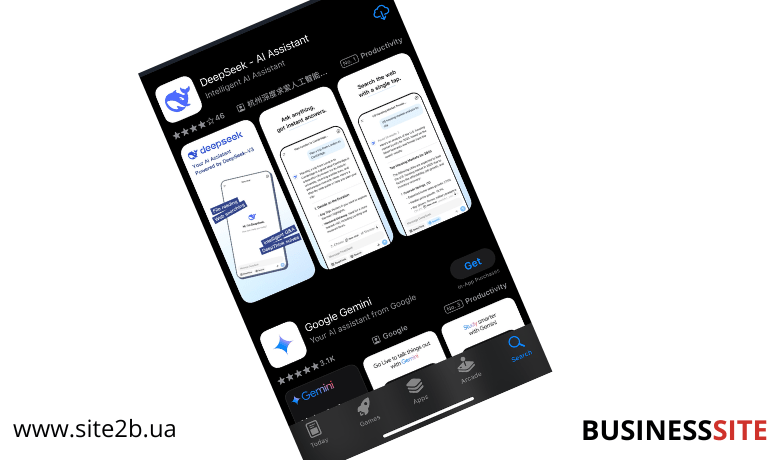
- Open your app store
App Store or Google Play.
- Search for “DeepSeek”
Select the official app from the developer.
- Download and install the app
- Tap “Install” (on Android) or “Download” (on iOS).
- Wait for the installation to complete.
- Open the app and log in
Launch DeepSeek.
- If you already have an account, log in with your credentials.
- If not, sign up.
- Customize DeepSeek for your needs
Allow access to the microphone and camera if necessary.
Tips for Using DeepSeek

- Device synchronization: If you use DeepSeek on multiple devices, log into the same account to sync data.
- Updates: Regularly update the app to get new features and improvements.
- Integration: DeepSeek can be integrated with other applications like Google Calendar, Trello, or Slack for even greater convenience.
Conclusion
In the AI market, where OpenAI, Google, and Microsoft have long been dominant, the emergence of DeepSeek has posed a real challenge to tech giants. In just a few months, this neural network has not only captured the attention of developers and researchers but has also triggered significant industry changes.
DeepSeek introduces a new approach to data processing and analysis, combining high processing speed, energy efficiency, and personalization. Unlike existing models, DeepSeek doesn’t just generate text or execute basic commands—it adapts to each user, learning from their queries and delivering the most relevant solutions.

At BUSINESS SITE, we have encountered numerous challenges that standard AI tools could only partially solve, but DeepSeek has managed to address them with its accuracy, flexibility, and adaptability.
What does this mean for businesses and users?
DeepSeek opens the door to a new level of efficiency. While AI was previously seen as an auxiliary tool, it is now becoming a true partner—one that understands context, anticipates needs, and helps make informed decisions.
Contact us, and we’ll find AI solutions that truly work for you!
Rate the article:





