45% of advertisers in Ukraine lose up to a third of their Google Ads budget due to irrelevant clicks and inefficient keyword match types: these are the figures I obtained while analyzing dozens of projects at BUSINESS SITE over the past two years. It would seem that the modern Google Ads interface and automation should protect businesses from such losses, but the reality is more complicated: algorithms without precise configuration of match types and negative keywords often lead to impressions for queries that don’t generate sales and only ‘eat up’ the budget.
In a situation where the cost per click is rising and competition for user attention is getting tougher, the issue of managing relevance and reach comes to the forefront. How can you ensure that every hryvnia spent works toward results? How do you protect against irrelevant impressions and increase ROI in contextual advertising Google Ads? Why do even experienced marketers make mistakes when selecting and setting negative keywords, losing traffic and conversions?
I am convinced: proper management of keyword match types and negative keywords is the key to a transparent, predictable, and profitable advertising campaign. In this article I will systematically explain how this works in practice, which solutions proved effective in BUSINESS SITE projects, and which strategies genuinely help businesses grow. If measurable results, budget control, and sales growth are important to you, I recommend reading to the end: here you will find not only theory but also practical tools for risk management and scaling advertising campaigns.
Match types in Google Ads: overview and how they work
In Google Ads keywords are not just a set of queries, but the foundation of the auction, where each word competes for your target audience’s attention. The match type you choose determines how relevantly the system will match your ads to users’ search queries.
Keyword match types determine how strictly or flexibly Google Ads will interpret your keywords when matching them to real queries. This is the foundation for controlling reach, traffic quality and budget efficiency. In my experience, this is where the difference is made between a campaign that generates leads and one that “wastes” the budget on irrelevant impressions.
Broad match keywords: pros and cons
Broad match is maximum reach, when Google Ads shows ads for queries that don’t necessarily contain your keywords in exact form. The system takes into account synonyms, variations, typos, and sometimes indirectly related phrases.
For example, if you added the keyword `flower delivery`, your ad may be shown for queries like `buy a bouquet for a birthday`, `flower shop nearby`, and sometimes even for less relevant variants. In one of BUSINESS SITE’s cases for an e-commerce project we saw that broad match led to a 40% increase in reach, but at the same time nearly doubled the share of irrelevant clicks.
Advantages of broad match:
Rapid campaign scaling.
Ability to find new demand segments that were not accounted for during keyword research.
Convenient for testing hypotheses and collecting data on new niches.
Risks and considerations:
High likelihood of irrelevant clicks, especially without a well-thought-out list of negative keywords.
Decrease in CTR (click-through rate) and deterioration of quality score.
Increase in cost per conversion due to traffic that does not lead to sales.
In BUSINESS SITE’s practice we recommend using broad match only in combination with an advanced negative-keyword system and regular analysis of search queries. For niches with limited budgets or high cost per lead, it’s better to prioritize narrower match types.
Phrase match in Google Ads: reach and relevance
Phrase match is a compromise between reach and precision. Ads are shown only for queries where the key phrase is contained in full and in the specified order, but additional words before or after are allowed.
For example, the key `tour to the Carpathians` will cover queries like `last-minute tour to the Carpathians`, `tour to the Carpathians for the weekend`, but not `Carpathians weekend tour`. This is especially important for the Ukrainian market, where word order often affects meaning and user intent.
In my experience, phrase match works great for segments where it’s important to control relevance while not losing reach. In one project for a travel agency we achieved a 25% increase in CTR and an 18% reduction in cost per lead simply by switching from broad to phrase match and carefully refining word order.
Advantages of phrase match:
Higher level of relevance compared to broad match.
Control over which query variations trigger ads.
Ability to test long-tail queries (long-tail) to increase customer LTV.
Considerations:
It’s important to consider word order — changing the order can significantly affect relevance and reach.
You need to regularly analyze the search terms report to identify new negative keywords and expand your keyword set.
Keyword optimization for budget
Exact match is maximum relevance: ads are shown only for queries that exactly match the keyword or its very close variation (declensions, plurals, and sometimes typos are taken into account).
The key `buy a laptop` in exact match (designated in Google Ads as `[buy a laptop]`) will cover only queries that are very close to this expression. For pharmaceutical companies, where each click is expensive, BUSINESS SITE’s practice has shown: exact match allows reducing the share of irrelevant clicks to 5% and increasing ROI by 30% by focusing on high-intent queries.
Advantages of exact match:
Minimization of irrelevant impressions and clicks.
High quality score and CTR.
Transparent budget control: each bid works for targeted traffic.
Considerations:
Narrowed reach, especially in competitive niches.
Requires regular expansion of the keyword set and adding new exact keywords as new trends and queries emerge.
Negative keywords in Google Ads: setup and match types
Negative keywords in Google Ads are a filter that protects the campaign from impressions on unwanted or irrelevant queries. By priority, negative keywords always “override” keywords: if a query contains a negative keyword, the ad will not be shown, even if the rest of the query matches the keyword.
In BUSINESS SITE projects, especially for online stores and banking services, competent work with negative keyword lists has enabled saving up to 25% of the budget and significantly increased traffic quality.
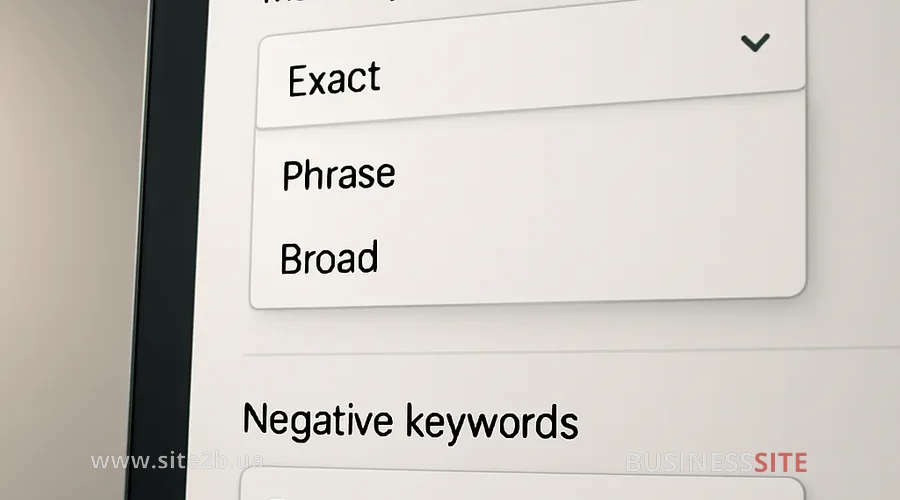
Negative keywords come in three match types:
Broad – blocks queries that contain all words from the negative phrase in any order.
Phrase: blocks queries where the negative keyword or phrase appears consecutively and in the specified order.
Exact: blocks only those queries that exactly match the negative keyword or phrase.
How to set up negative keywords in Google Ads?
You can add negative keywords at the account, campaign, or ad group level. For large projects I recommend creating thematic negative keyword lists: for example, a separate list for competitor brands, and another for irrelevant categories or services.
In Google Ads Editor it’s convenient to manage negative keywords in bulk: import lists, change match types, and quickly make edits across all campaigns. This approach has proven effective in BUSINESS SITE projects for e-commerce, where the assortment is often updated and it’s necessary to respond quickly to new irrelevant queries.
I recommend regularly analyzing the search terms report and replenishing negative keyword lists as new unwanted phrases appear. This is especially relevant for niches with a large number of synonyms and variations.
How to correctly select and inflect negative keywords
For the Ukrainian market it’s important to take into account the language’s morphology: cases, numbers, genders, as well as possible typos. For example, the negative keyword `free` will not block the query `free delivery` unless the corresponding form is added.
In BUSINESS SITE practice we use automatic inflection tools (for example, ProfitHunter) and manual checks to cover all relevant variations. In one case for laboratory diagnostics, adding inflected forms of negative keywords reduced irrelevant impressions by 12% without losing reach.
I also recommend taking into account common typos and English-language variants if your audience may use them in search.
Diagnosing keyword blocking by negative keywords in Google Ads
Sometimes negative keywords can accidentally block impressions for important keywords — this is one of the common mistakes leading to traffic loss and reduced conversions. Google Ads has diagnostic tools: the system notifies you if a keyword is not receiving impressions due to conflict with a negative keyword.
At BUSINESS SITE we regularly use the ‘Recommendations’ tab and keyword status reports to identify such conflicts. It is important to respond promptly: adjust negative keywords, change their match type, or split campaigns by themes.
Keyword Match Types in Advertising
Types of keyword and negative keyword match directly affect the cost-per-click, CTR, conversion, and the final ROI of an advertising campaign. In my experience, proper management of these parameters can save up to 30% of the budget without losing reach.
Balance of reach and relevance: a key factor in budget optimization. Broad match provides maximum reach but requires strict control of negative keywords to avoid spending money on irrelevant clicks. Exact match ensures high conversion but limits scalability.
In one BUSINESS SITE case for a construction company, shifting from broad to phrase and exact match reduced the cost per conversion by 22% and increased the share of targeted inquiries by 1.5 times.
Scaling campaigns by match types
To scale campaigns, it’s important to combine different match types. BUSINESS SITE’s strategy: launch a test campaign on broad match with advanced negative keywords to collect statistics, then identify the most effective queries and move them to phrase and exact match.
Automated bidding strategies (for example, Target CPA or Maximize Conversions) work more effectively when keywords are highly relevant. It’s important to regularly review campaign structure and adjust match types as statistics accumulate.
Scaling also requires continuous expansion of the keyword set: adding new long-tail keywords, analyzing new search trends, and regularly auditing negative keywords.
Setting match types and negative keywords in Google Ads Editor
Google Ads Editor – an indispensable tool for bulk management of keywords and negative keywords. At BUSINESS SITE we use it for:
Quick import and export of large lists of keywords and negative keywords.
Simultaneous changing of match type for hundreds or thousands of phrases.
Grouping keywords by topics for more precise management of bids and negative keyword lists.
Step-by-step instructions:
Import the list of keywords or negative keywords into Editor.
Select the required rows and set the match type (broad, phrase, exact).
Use filters to find overlaps between keywords and negative keywords.
Synchronize changes with the Google Ads account.
This approach is especially effective for online stores and services with a large assortment, where manual management becomes inefficient.
Google Ads: match types and negative keywords
Which keyword match types are most effective for attracting a target audience?
How to correctly select and configure negative keywords to avoid irrelevant impressions?
In which cases should you use broad match, and when should you use exact match?
How do match types affect the budget and profitability of an advertising campaign?
What risks are associated with using broad match and how can they be minimized?
How to scale advertising campaigns taking into account different keyword match types?
How to diagnose and fix ad serving blocks caused by negative keywords?
Which Google Ads tools help manage match types and negative keywords?
I hear these questions at almost every strategy session with BUSINESS SITE clients — and it is precisely around them that we build tailored solutions for each business.
Working with keyword match types and negative keywords in Google Ads
A well-considered selection and management of keyword match types is not just a technical task, but a strategic tool for business growth. Negative keywords are a necessary filter that protects the budget and improves traffic quality. Regular diagnostics, using Google Ads Editor, and implementing automation make it possible to build scalable, transparent, and cost-effective advertising campaigns.
The experience of BUSINESS SITE confirms: only a systematic approach, continuous analysis, and flexible management of semantics yield the best results in Google Ads search advertising. Apply these strategies, and your advertising budget will work to drive sales growth, not random clicks.
Keywords: keyword match types, Google Ads negative keywords, campaign optimization, management of keyword match types, Google Ads keywords, Google Ads phrase match, exact match to increase relevance, setting match types in Google Ads Editor, scaling campaigns with different match types, impact of negative keywords on campaign performance.