
Imagine an online store that is visited by 10,000 people in a day. If 200 of them place an order, the conversion rate (CR) will be 2%. This metric directly impacts profit: the higher the conversion, the more revenue is generated with the same flow of visitors.
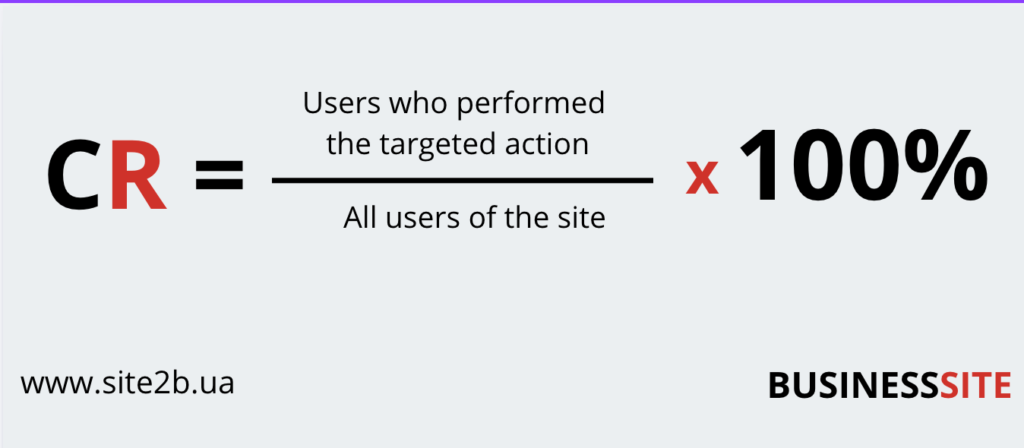
Conversion reflects not only the effectiveness of advertising campaigns but also how well the site meets the needs of the target audience.
To understand how conversion works, it is necessary to consider the concept of a sales funnel. This model describes the customer’s journey from the first introduction to a product to the moment of purchase.
Main stages of the sales funnel:
- Attraction: The user first learns about your store through contextual advertising, SEO promotion, or social media.
- Engagement: The client visits the site, explores the product range, and reads product descriptions.
- Conversion: The client performs the target action — purchases a product, subscribes to a newsletter, or submits an inquiry.
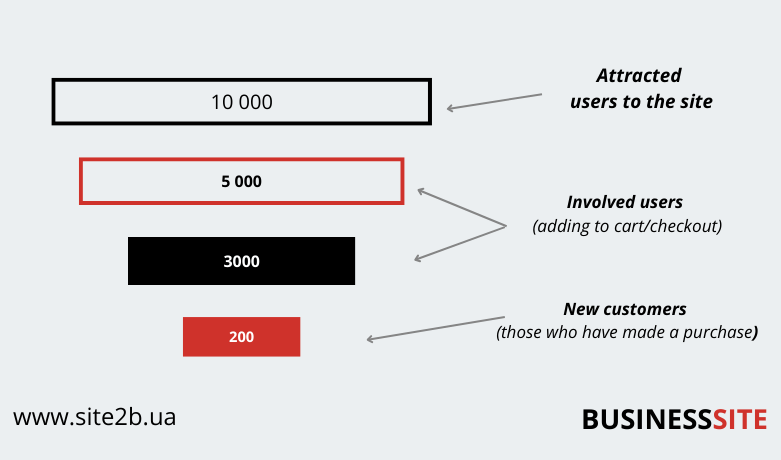
Each stage of the funnel has its own transition rate.
For example:
- Out of 10,000 visitors:
- 5,000 added products to the cart,
- 3,000 started the checkout process,
- only 200 completed the purchase.
Conversion also directly affects customer acquisition costs. The higher the CR, the less your business needs to pay for each customer.
To attract 1,000 website visitors, you need to spend $100.
If the CR (Conversion Rate) is 1%, you gain 10 customers for $100, and the cost per customer is $10.
But if the CR increases to 2%, you gain 20 customers for the same $100, reducing the cost per customer to $5!
Keep reading to learn how to maximize your online store’s conversion rate!
Factors affecting the conversion of an online store
An online store with a high conversion rate is a business that understands its customers, their needs, and concerns.
To increase conversion, it is crucial to understand what barriers prevent visitors from completing purchases, how to eliminate them, and what tools can optimize every stage of customer interaction.

Next, we will analyze the key aspects affecting conversion and show how you can use this knowledge to grow your online store.
Website convenience and speed
Today’s users are impatient. If a website loads slowly or is difficult to navigate, they will leave and go to competitors. For instance, Google research shows that a 1-second delay in loading can reduce conversion by 7%.

Optimize page loading speed. Compress images, use modern caching technologies. Ensure easy navigation with a simple menu, clear categories, and a convenient search feature.
A BUSINESS SITE client (an electronics online store) conducted a site speed audit. As a result of image optimization and server tuning, page loading time was reduced by 2 seconds. Conversion increased from 1.8% to 2.6% — over 300 additional orders per month!
Content quality
Many online store owners neglect product descriptions and use low-quality images, which leads to customer distrust.

- Create unique product descriptions. Provide detailed information about the features and benefits of the product. Show how the product solves customer problems. This can be done using neural networks.
- Use high-quality images: photos in high resolution with zoom options. Add 360-degree views or videos.
A children’s toy store improved product descriptions by adding information about materials, safety certificates, and demonstration videos. This increased conversion by 12%, as parents gained more trust in the store.
Checkout process
Complicated registration forms, numerous steps during checkout, and hidden additional costs often deter customers.
- Simplify the process. The checkout process should take minimal time and be intuitive.
- Add guest checkout. Allow customers to place orders using only their name and phone number.
- Transparency in pricing. Ensure that additional costs (e.g., delivery fees, taxes) are visible upfront to prevent customers from feeling deceived.

Jeff Bezos, the founder of the largest online store, Amazon, noticed that many customers of his then-bookstore were not completing the checkout process. He hypothesized that people were simply unwilling to fill out lengthy forms, so he introduced the revolutionary “Buy in 1 Click” option. This innovation became a driving force for the explosive growth of his business, turning it into a multinational corporation!
User trust

- Include reviews and ratings. Display real feedback from satisfied customers.
- Provide information about returns. A money-back guarantee and clear terms make purchases less risky.
- Highlight certificates and awards. If your store has received awards or offers certified products, showcase this information.
For a BUSINESS SITE client, we implemented a block with customer reviews and real photos of buyers. This increased conversion by 18% in the first two months.
Mobile adaptation
With the growth of mobile traffic, ignoring a mobile-friendly website can cost you half your customers. More than 67% of online purchases are made on mobile devices, and if the site is inconvenient on a smartphone, users will leave.
- Optimize the design. Follow the Mobile First principle — develop the mobile version first, then scale it up for desktop.
- Simplify interaction. Use large buttons, clear forms, and quick access to the cart to help users place orders faster.
Payment and delivery methods
- Diverse payment options. Offer cards, e-wallets, payments via Apple Pay/Google Pay.
- Flexible delivery options. Indicate delivery costs on the product page and provide options: courier delivery, pick-up, or parcel lockers.
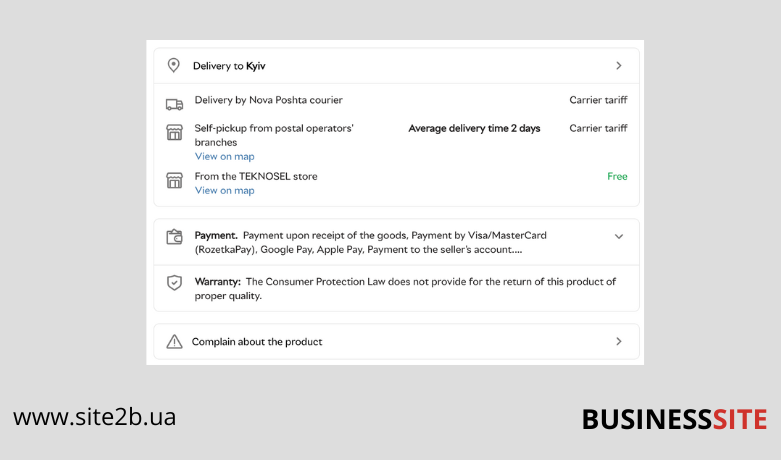
After implementing PayPal for international orders, an accessories online store increased conversion in overseas regions by 22%.
Personalization
A one-size-fits-all approach to every user reduces the likelihood of purchases. People prefer individualized attention.
- Personalized recommendations. Use customer behavior data to suggest products they might be interested in.
- Dynamic blocks. Display discounts or banners based on the user’s previous actions.
How to increase conversion: step-by-step guide
Improving conversion is a process that requires a structured approach. Knowing what affects conversion is important, but achieving real results is impossible without systematic work on these factors.

Step 1: Conduct in-depth analytics
Before making changes, it is crucial to identify where you are losing customers. Data analysis is the first step in identifying problems and growth points.
Use analytics tools:
- Google Analytics 4: Tracks user behavior on the site, identifies pages with high bounce rates, and analyzes user paths.
- Hotjar: Heatmaps and session recordings help understand which site elements cause difficulties.
- Crazy Egg: Identifies which elements of a page attract the most attention from users.
Key areas to focus on:
- Sales funnel: Determine which stage of the funnel experiences the highest customer drop-off (e.g., cart-to-checkout transition).
- Exit pages: Which pages do users leave most often? This may signal issues with content or page structure.
- Click map: Shows which site elements get the most attention and which are ignored.

Step 2: Formulate hypotheses
Based on analytics data, create a list of hypotheses.
- “Simplifying the checkout process will increase conversion.”
- “Adding product recommendations in the cart will boost the average order value.”
- “Optimizing the mobile version will increase mobile device sales.”
- Impact: The potential effect of the change.
- Confidence: How confident you are in the success of the hypothesis.
- Ease: How easy it is to implement the change.
Step 3: Test changes
Once hypotheses are formed, begin testing. Use A/B testing for this:
- Divide traffic into two groups: one sees the current version of the site, the other sees the modified version.
- Compare results: Which version of the site generates more conversions?
Testing tools:
- Google Optimize: A free tool for creating A/B tests.
- Optimizely: A powerful solution for multivariate testing.
- VWO (Visual Website Optimizer): Analyzes user behavior and tests changes.
Step 4: Optimize the payment process
Gather customer feedback to understand the challenges they face during the checkout process. Common issues include limited payment options or complex forms.
- Ensure the site supports popular payment methods: cards, e-wallets, Google Pay, Apple Pay.
- Check whether the payment form is convenient for mobile users.
- Add an option to save payment data for future purchases.

Step 5: Monitor results and implement changes
Improving conversion is an ongoing process. After testing and implementing changes, continue to analyze data. Monitor the following metrics:
- Bounce rate.
- Percentage of completed orders.
- Average order value.
Automation of analytics:
- Set up regular reports in Google Analytics.
- Use dashboards (e.g., Power BI or Google Data Studio) for data visualization.
Step 6: Automate customer interaction
To increase the efficiency of your online store, implement automation tools:
- CRM systems: Track deal stages and analyze customer interactions.
- Chatbots and live chats: Provide quick support to users.
- Email marketing: Send personalized offers or reminders about unfinished purchases.
Conclusion

If you need assistance with setting up analytics or developing an optimization strategy, the BUSINESS SITE team is ready to offer comprehensive solutions that deliver results!
Rate the article:





