
Gemini is a multimodal AI from Google that can work with text, images, voice, and even code. It is built on the Gemini 1.5 language models and is the official replacement for Google Assistant. But the main thing is that it not only answers questions but also helps in decision-making. Unlike other neural networks such as ChatGPT or Claude AI, Gemini is deeply integrated with Google’s ecosystem. This means it can analyze emails in Gmail, documents in Google Docs, videos on YouTube, and even manage Google Calendar. It’s not just a chatbot — it’s a work tool.
If you are an entrepreneur, marketer, or department head who is always pressed for time, this article will save you hours. I will show you how to implement Google Gemini not in theory, but in real business processes. No fluff, no technical jargon—just what really works. From step-by-step launch instructions to cases we’ve already implemented in BUSINESS SITE projects. Read on, and you’ll learn how a single neural network can handle tasks that previously required an entire team.
What Gemini Can Do: Overview of Features
Gemini is not just a “chat with AI.” It’s a full-fledged work tool that can be used for dozens of tasks, from marketing to project management. It operates both as a chat and through deep integration with Google’s ecosystem. Let’s break it down by direction.
Standard Functions of an AI Chatbot

- Text generation
- Code generation (from HTML to Python)
- Working with images (Analyzing screenshots and photos, generation by prompt)
- Document analysis PDF, Word, Google Docs.
We tested the scenario: “Create a long-read on Mobile First design for a blog.” Gemini not only provided the structure but also drafted headlines, subheadings, and text blocks. For a copywriter, this is at least 2-3 hours of manual work. As a result, we received 80% ready material, which only needed to be “polished” to fit the blog style. This is already saved money and accelerated project timing.
Integrations with Google Services

This is where the real magic begins. Gemini does not exist in a vacuum—it is embedded into the Google ecosystem and can execute commands in other services.
Gmail
- Drafting emails based on incoming messages.
- Automatic dissection of email threads: Gemini can extract the essence, deadlines, and task lists from emails.
- Template setup: create a series of structured emails (e.g., sales funnels) and adapt them to a specific client.
- Search email content: “Find the email from the supplier where it talks about a 10% discount.”
Google Docs
- Creating documents from scratch: by voice or text request—structure, content, headings.
- Editing and proofreading: Gemini fixes spelling, adapts style, simplifies long sentences.
- Simplifying complex texts: if you received a 4-page brief from a client, ask Gemini—it will summarize it into 5 paragraphs.
Google Sheets
- Automatic table creation: for example, you can say: “Create a table for CRM with fields: Name, Phone, Email, Deal Status.”
- Data analysis: unload statistics—ask Gemini to find deviations, trends, predict indicators.
- Formulas and automation: the neural network helps to write complex formulas and explains their meaning.
- Pivot tables, charts, visualization: without the need to be an “Excel guru.”
Google Drive
- Search files by context: “Find the landing presentation for December,” “Show all contracts with an amount over $10,000.”
- Viewing and analyzing file content without opening each document.
- Reporting on storage content: who on the team uploaded what when, what files are outdated, where duplicates exist.
Google Calendar
- Creating events and reminders based on tasks from e-mail or voice commands.
- Scheduling for the day/week/month with priorities and completion times.
- Synchronization with other users: Gemini can analyze all participants’ calendars and find “slots” for meetings.
YouTube
- Video analysis: Gemini can deconstruct video content and provide a short summary or insights list.
- Creating video scripts: based on the theme, duration, and structure (for example, YouTube Shorts format).
- Generating descriptions, titles, hashtags—in a given style for a specific target audience.
- Creating collections: “Pick 5 videos for training on Email Marketing”—Gemini finds and provides links.
Additionally: Google Meet, Google Maps, Google Sheets API
- Gemini can be linked to Google Meet—it will transcribe meetings, highlight key points, and send summaries to the chat.
- In conjunction with Google Maps—it plots routes, selects nearby points (e.g., partner offices or client addresses).
- Through API integrations, Gemini can run automated scripts: for instance, with an incoming email with an attachment—create a task, add the file to Drive, and send a calendar reminder.
Gemini vs Other Neural Networks

| Criterion | Gemini (Google) | ChatGPT (OpenAI) | Copilot (Microsoft) | Grok (xAI) | DeepSeek |
|---|---|---|---|---|---|
| Integrations | Gmail, Docs, Calendar, Drive, YouTube | Third-party plugins, API | Excel, Word, PowerPoint, Teams, Outlook | Integration with X (formerly Twitter) | No ecosystem integrations yet |
| Multimodality | Text, image, voice, documents, video | Text, image, files | Text, working with documents, voice | Text, images, X-posts | Only text |
| Language Model | Gemini 1.5 Pro | GPT-4 / GPT-3.5 | GPT-4 (via Azure OpenAI) | xAI Grok v1 | DeepSeek-LLM |
| Unique Features | Deep integration with Google, mobile assistant | Plugins, DALL·E, built-in bots | Integrated into Microsoft 365, built into Windows | Sarcastic style, quick access to social networks | Optimized for the Chinese market and developers |
| Russian Language Support | Partially (under development, better in English) | Excellent | Excellent | Limited | Limited |
| Business Focus | High—task management, content, CRM | Universal | Maximally corporate—Microsoft ecosystem | Weak for now | More geared towards developers |
| Availability | Limited: full power—only by subscription | GPT-3.5—free, GPT-4—$20/month | For Microsoft 365 users | Only for X Premium paid users | Free with limitations |
How to Use Gemini for Work, Business, and Personal Tasks

Google Gemini is not about “playing with artificial intelligence.” It’s about delegating routine tasks, freeing up resources, and starting to use AI as a full-fledged assistant. Below are real areas where Gemini is already showing significant effectiveness, in both business and personal productivity.
Marketing and Content Creation

- Topic selection for blogs, YouTube, or Instagram based on keywords and audience pain points.
- Generating chains of short videos (TikTok, Reels, Shorts).
- Rapid hypothesis testing: Gemini provides dozens of USP options to choose from.
- Can adapt to different segments: for “hot” clients, for B2B, for a young audience.
- Helps to form a semantic core for SEO website.
- Analyzes competitive keys,
- Can generate Title/Description/Headers and write an SEO text.
- Example: “Collect 20 key queries for the page ‘Landing Page Development’.”
Using Gemini in Sales

- Writing scripts and handling objections. Example: “Write a script for the first call to a client about SEO promotion services.” Or “Write 5 reasoned responses to the objection ‘expensive’.”
- Call analysis (if connected to Google Meet / recordings): Transcribing the conversation, highlighting the essence, assessing emotions.
- Can compile a report: was there an attempt to close the deal, which questions remained open.
Administration: Rhythm, Control, Order

- Task distribution: Creating a task list for the day/week/month by priorities, assigning tasks to the team—when used together with Google Calendar and Workspace.
- Report generation: Turns dry tables into readable reports: analysis, conclusions, recommendations, generates KPI reports for the team.
- Document management: Writing templates for contracts, acts, agreements, adapting to a specific client or deal.
Personal Tasks You Can Delegate to Gemini

- Day planning. Voice or text your to-do list—get a schedule with time slots.
- Gifts and ideas. Selecting gifts, restaurants, travel routes.
- Conflict/letter resolution. Gemini can rewrite an “angry” email in a diplomatic tone, retaining the essence and not spoiling relationships.
How to Register for Google Gemini
To start using Google Gemini, you don’t need to go through a complicated process — everything is as simple as possible, especially if you already use Google services. Below is a guide for the web version, Android, and iOS.
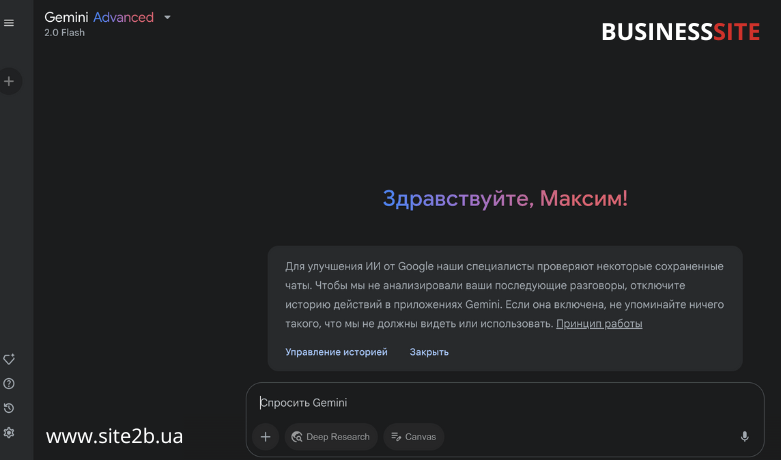
Registration via the Web Version (on a Computer)
- Step 1: Go to the official website: https://gemini.google.com
- Step 2: Click the “Sign in” button in the top right corner.
- Step 3: Enter the credentials of your Google account (the same one you use for Gmail or YouTube).
- Step 4: After signing in, you’ll be taken directly to the Gemini chat interface. You can start typing your query.
How to Install and Activate Gemini on Android
- Step 1: Open Google Play Market.
- Step 2: Find the “Gemini” app (formerly Google Bard) — make sure the developer is listed as Google LLC.
- Step 3: Install the app and open it.
- Step 4: On first launch, choose your Google account.
- Step 5: Allow it to replace Google Assistant (optional). Now, when you long-press the Home button, Gemini will launch instead.

How to Use Gemini on iOS (iPhone/iPad)
- Step 1: Open the App Store.
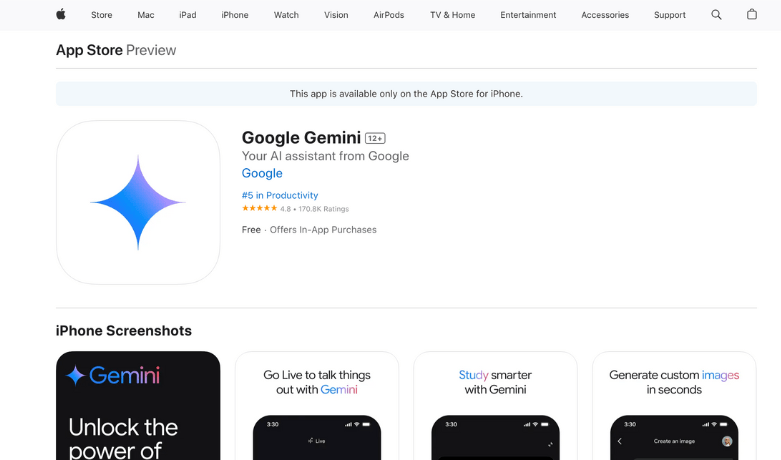

- Step 2: Install the Google app (the official Google app, inside which Gemini works).
- Step 3: Sign in to the app with your Google account.
- Step 4: Tap the Gemini button (an icon with a “star” or “AI”).
- Step 5: Accept the terms of use and start chatting with the AI.
Important Things to Know When Registering
- Google One AI Premium — a subscription that gives you full access to Gemini’s capabilities (including the Gemini 1.5 Pro model), costs $19.99/month. You can activate it in the “Subscriptions” section of your account.
- Regional restrictions — if Gemini is not available in your country, you may need a VPN for the initial login (after that, it works reliably).
- Language support — most features are currently available in English, although the Russian-language interface is gradually being adapted.
Conclusions:

- Gemini is not just a trendy AI from Google. It is a working tool, embedded in the digital ecosystem, that truly helps businesses:
- Reduces the cost of routine operations, eliminating tasks from employees related to writing, structuring, analyzing, and planning.
- Increases the speed of marketing and sales: from USP generation to email communication automation and script creation.
- Deeply integrated with Gmail, Docs, Sheets, Calendar, and even YouTube, offering something no other AI on the market does.
- Adaptive to voice, text, images, and documents—you can dictate, upload, edit, manage.
- It unleashes greater potential if you are already using Google services at work.
But if you are:
- An entrepreneur who wants to save time on routine tasks;
- A marketer who needs a 24/7 assistant;
- A manager who wants to organize tasks and communications;
— Gemini is what you should implement today. In BUSINESS SITE team projects, we have already integrated it into workflow processes and achieved real returns: time savings, increased efficiency, and speedier content production and management decisions. If you need a partner to implement AI in your business competently and with results—reach out. We don’t offer theories, but proven solutions that we first tried ourselves.
Rate the article:





